

Mapping a CSV import with one model call (Jev)
- The question
- How much of a CSV column mapping can be settled in code, and can a single model call handle everything that is left?
- What came out
- Strict matching settles up to 7 of 10 columns for free, and one call scores every remaining pair in under 700 ms for a tenth of a cent.
What I wanted to find out
Every product that imports a CSV has this screen. The user uploads a file, and something has to decide that their Lineitem sku is your sku.
You could already do this with a small LLM, and it worked reasonably well. What you got back was a string you had to trust, after a wait the user could feel. I wanted to know whether the same job could be split three ways instead: let plain code settle everything code can settle correctly, ask a model once for all the rest at the same time, and then bring the decision back into code where I can see it and change it.
Jev makes the middle part cheap. It writes no text, it answers questions my code defines, and it returns a probability for each one. So the question is not really “can a model map columns”. It is how much of the work never needs the model at all, and whether one call can carry what is left.
How it was tested
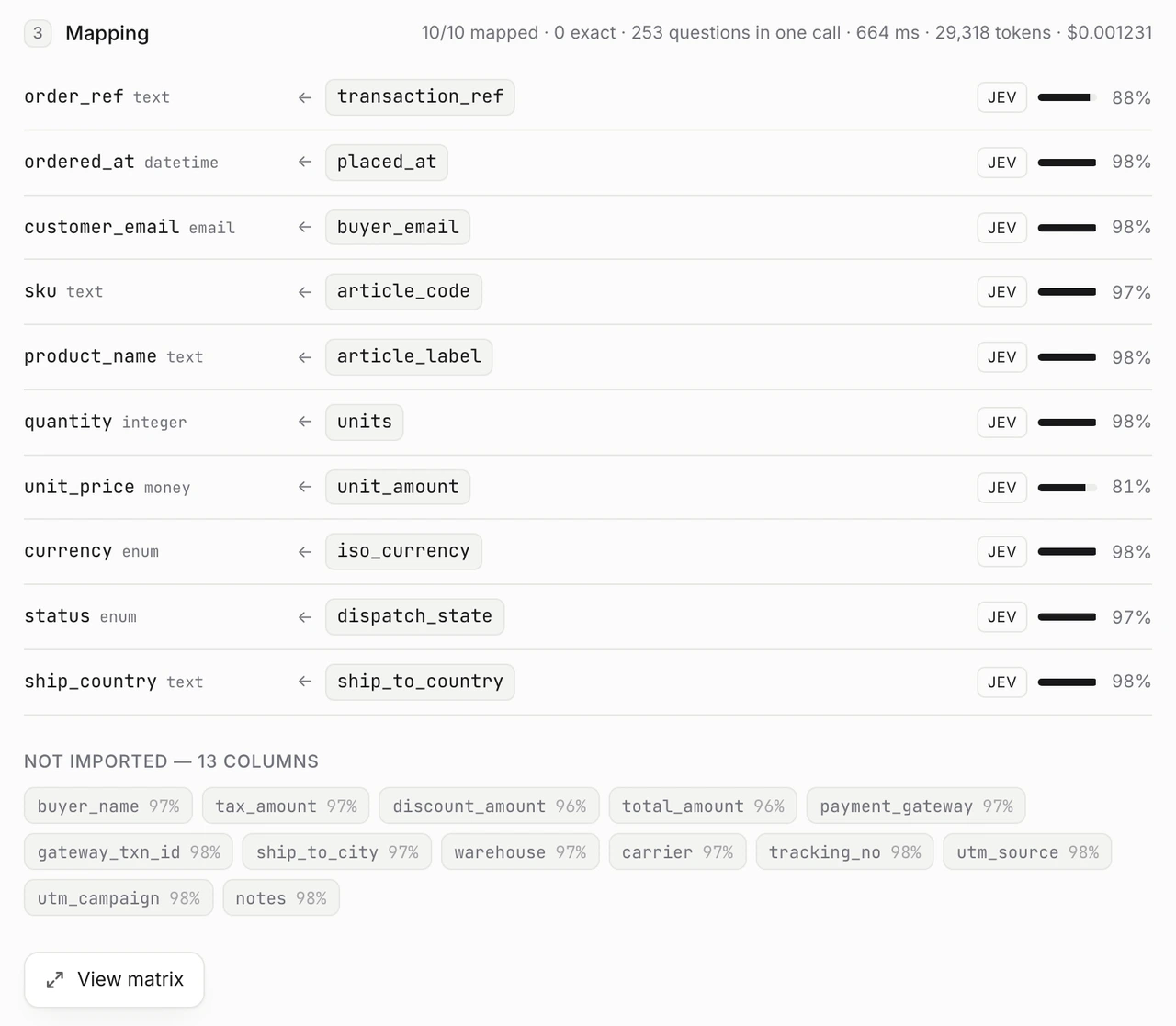
Three destination tables, ten columns each, and nine sample CSVs chosen for the awkward cases rather than the easy ones: a clean HubSpot export, a file entirely in French with two different email columns, a Shopify export where Name is the order number, a warehouse export with 23 columns of which 13 belong nowhere.
Each destination column carries a one-line description, and that description is not decoration. It is what separates two neighbouring fields.
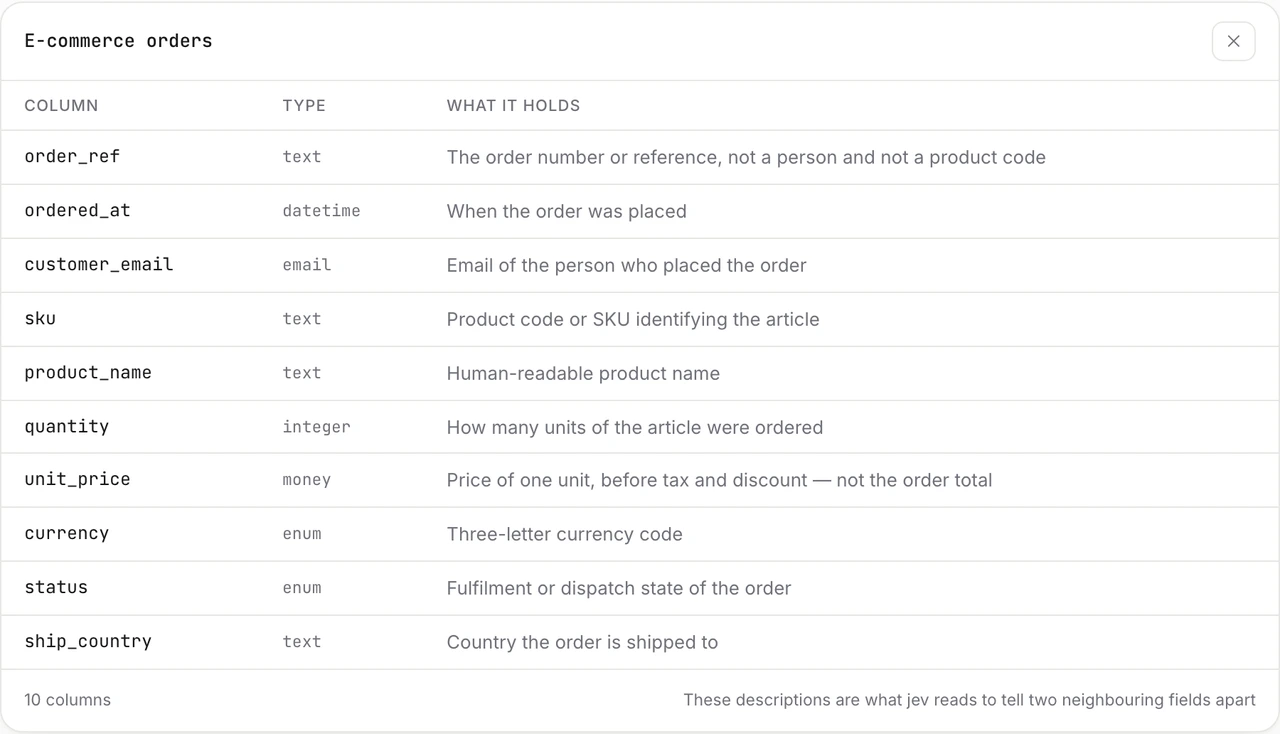
The run itself is three stages, and only the middle one is a model.
Stage 1 · in code, free and instant
Stage 2 · one call, every remaining pair at once
Stage 3 · in code again
The shape of the questions is the one design decision worth arguing about. Asking one multiple-choice question per incoming column would be the obvious move, and it is the wrong one.
One choice per incoming columnThe obvious shape
- Has to pick one of the destinations, always
- When nothing fits, it still names something, around 0.85
- Nothing in the answer says "none of these"
A yes/no per pair, plus a guardWhat was built
- Every pair gets its own number, independent of the others
- A column can score low everywhere, which is what "not in this table" looks like
- The guard asks directly whether it belongs nowhere
What came out
All nine files went through in a single call.
| File | Columns | Settled in code | Questions | Jev time | Cost |
|---|---|---|---|---|---|
crm-hubspot-export.csv | 10 | 7 | 12 | 464 ms | $0.000077 |
hr-bamboo.csv | 8 | 5 | 18 | 374 ms | $0.000109 |
orders-minimal.csv | 5 | 0 | 55 | 409 ms | $0.000287 |
hr-payroll.csv | 10 | 2 | 72 | 484 ms | $0.000362 |
crm-eventbrite.csv | 7 | 0 | 77 | 514 ms | $0.000395 |
orders-shopify.csv | 10 | 1 | 90 | 437 ms | $0.000462 |
crm-french-crm.csv | 10 | 0 | 110 | 495 ms | $0.000549 |
hr-identity-provider.csv | 12 | 0 | 132 | 474 ms | $0.000658 |
orders-warehouse-export.csv | 23 | 0 | 253 | 675 ms | $0.001231 |
Twenty-one times the questions costs 1.45 times the wait. Twelve questions take 464 ms and 253 take 675 ms. That is the property the whole design rests on: if each question were its own call, the warehouse file would be a two-minute wait instead of a two-thirds-of-a-second one, and the matrix would be unusable.
On the HubSpot export, 7 of the 10 columns never reach the model at all. That part is free, instant, and cannot be wrong.
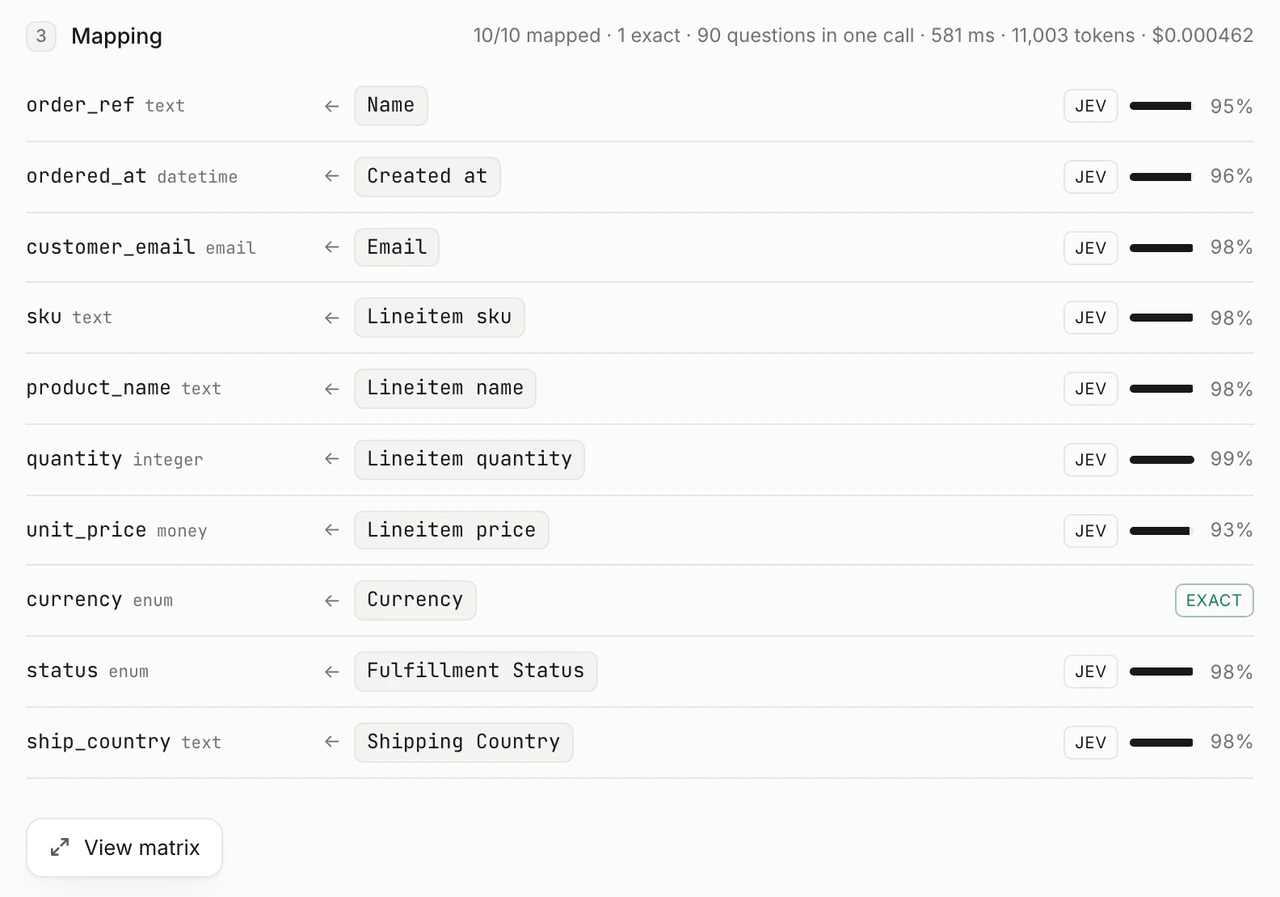
The sample values do most of the work. Each column is sent with three of its values, truncated to the first and last 100 characters. That is what tells the model that Shopify’s Name is an order reference, and it is why the same column name maps differently depending on what is underneath it.
One call, and then every number is yours
The call returns the whole matrix, not a decision. Opening it is the clearest picture of what actually happened.
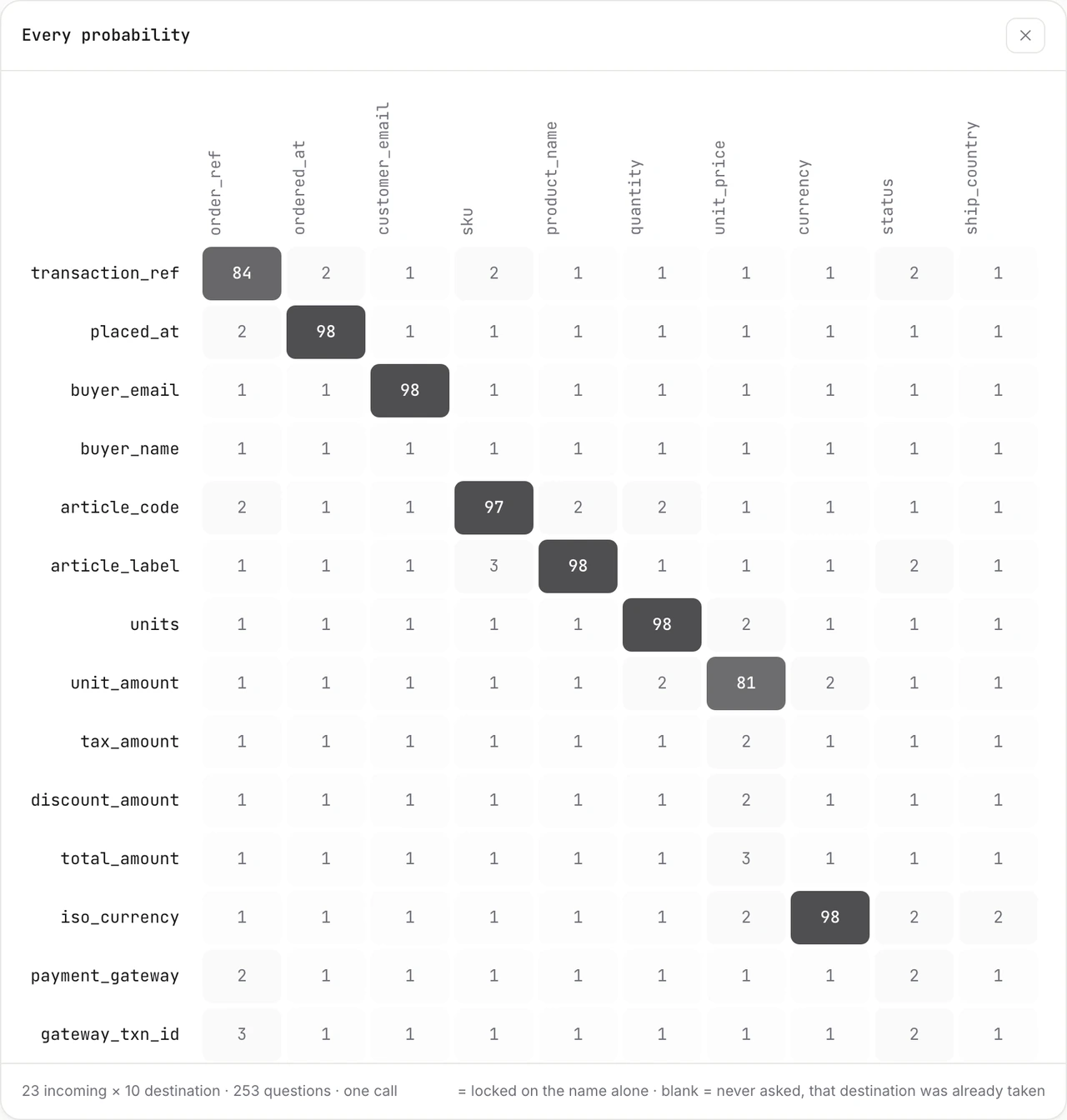
Because the code holds every number, the threshold is a constant I can move rather than a behaviour I have to prompt for. At 0.75 the warehouse export maps all ten destinations and drops the right thirteen columns.
Where it hands back
The Eventbrite file is the one it cannot finish, and that is the interesting screen.
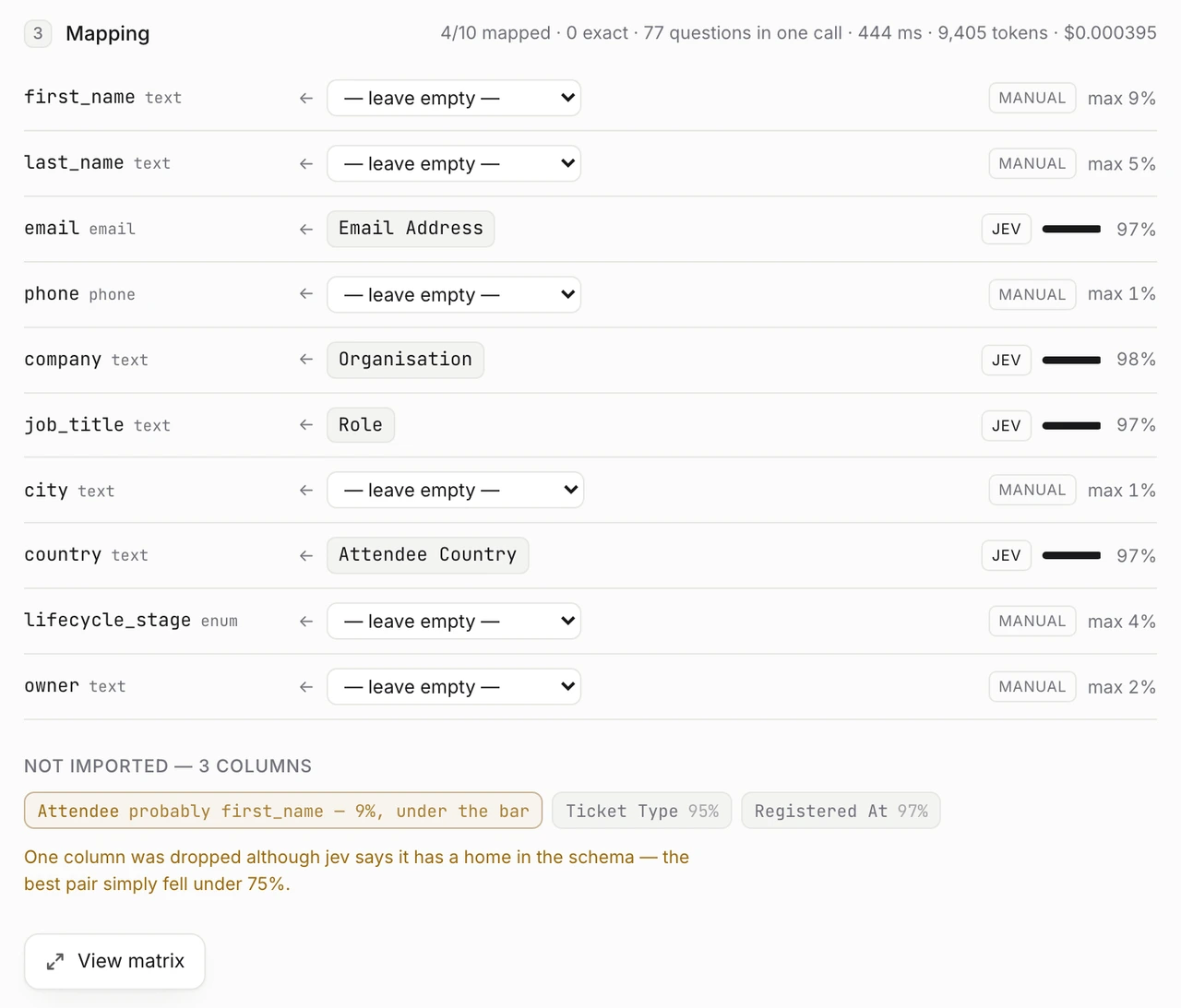
The guard question earns its place at the bottom of that screen. Attendee scores 9% on “does this belong nowhere”, so the model is saying it does have a home, but its best pair fell under 0.75. The interface marks it amber instead of dropping it quietly. Ticket Type at 95% and Registered At at 97% are dropped without comment, because they genuinely belong nowhere.
What I take from it
Do the deterministic part, and nothing more than the deterministic part. The first version normalised case, accents and separators, and then also carried a small alias table: attendeecountry to country, site to location, team to department. Those are judgements wearing the costume of normalisation, and they break twice. A file containing both Attendee Country and Company Country produces two exact matches on one destination, and the code locks whichever came first in column order, silently. And team is not department, it is a question. Removing the aliases made the problem disappear rather than forcing me to arbitrate it, because now neither column is exact and the model separates them on their values.
Ask once, decide afterwards. One call returns 253 calibrated numbers in 675 ms, and everything after that is arithmetic I can read: the threshold, the order of resolution, what counts as a warning. Nothing about the outcome depends on a model having been persuaded to behave. Moving the bar from 0.75 to 0.80 is a constant, not a prompt.
A probability is worth showing. Since the number exists anyway, the interface prints it, and a mapping at 81% reads differently from one at 98%. The model is doing a pre-pass, not making the decision: the user sees how sure it was, on which column, and takes back control on the ones that matter. That is a better deal than a confident dropdown with no number on it.
This was tested on nine files, three tables and ten destination columns each. A schema with 40 columns would need more than one call, and the second budget in jev’s context window does not split, so a very wide destination table is a real limit rather than a slow path. I have not tried it.