

Simple AI efficiency hack for AI chat products
If you build an AI chat feature, you’ll want to show a title for each conversation in a sidebar. Something like “Claim for a broken windscreen” instead of “New chat”.
There are two easy ways to do it, and both are a bit wrong.
The first is to write the title once, from the first message. That’s cheap, but the first message is often the least useful one. In the Claude app, for example, the title is written at the start and that’s it. So if you open with “hey, quick question”, your conversation may be called “Greetings” forever, even after 30 messages about something completely different.
The second is to rewrite the title after every message. It stays accurate, but you pay a model call on every single turn, for a feature that’s almost cosmetic. And the topic of a conversation doesn’t change every message.
The rule
I only regenerate the title on message 1, 2, 3 and 5, and then on every multiple of 5.
The first few messages are where the topic actually gets clear, so the title gets rewritten often there. After that, once every 5 messages is enough to catch a conversation that drifted.
In n8n it’s one If node in front of the title generator (that’s the screenshot at the top). The condition is this:
[1, 2, 3, 5].includes(messages.length)
  || (messages.length > 5 && messages.length % 5 === 0)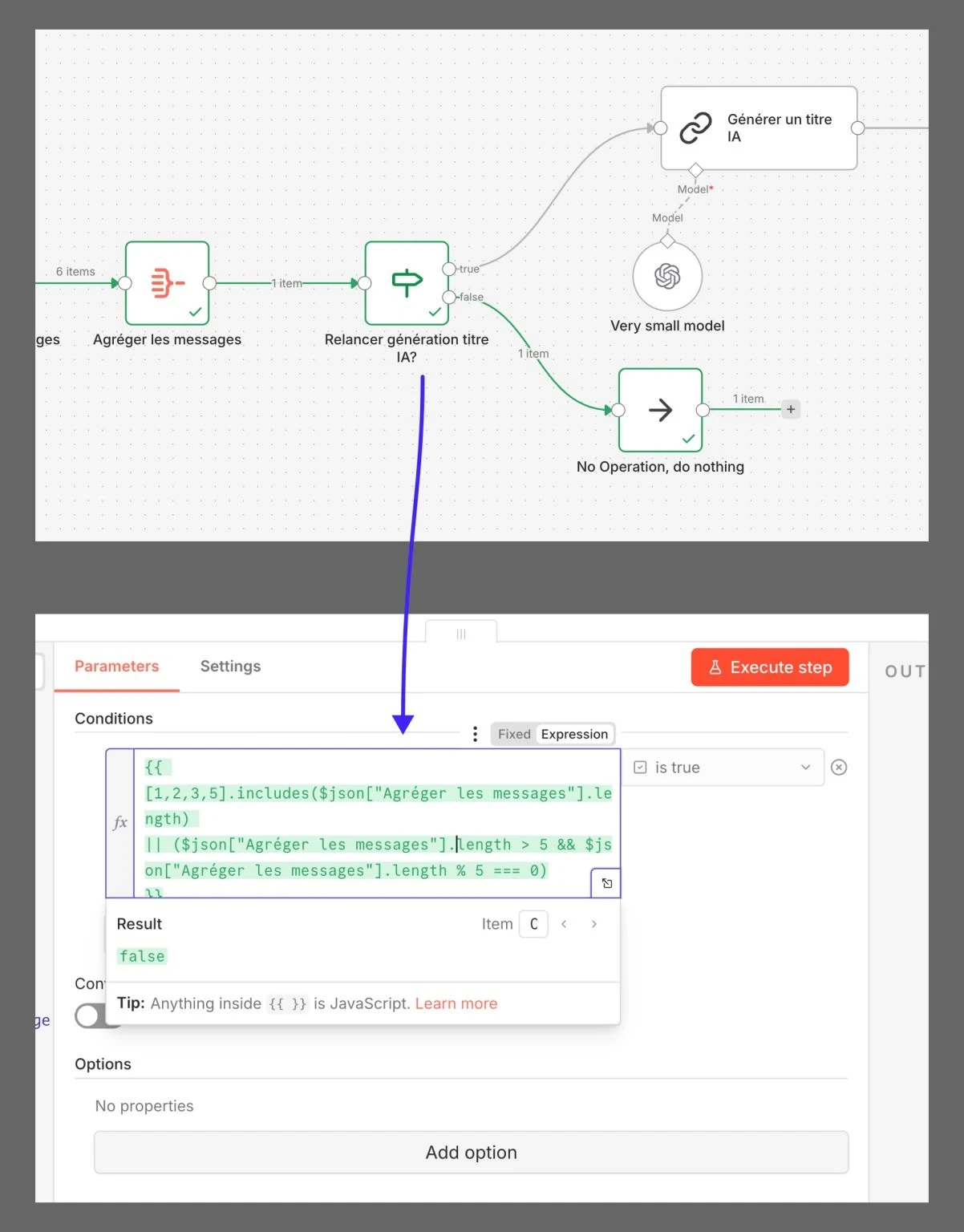
I asked AI to write that expression once and it has worked since.
On a 20-message conversation that’s 7 generations instead of 20. At 40 messages, 11 instead of 40. At 60, 15 instead of 60, so 75% fewer calls, and the saving keeps growing with the length of the conversation.
Don’t send the whole conversation
The number of calls is half of the cost. The other half is what each call reads.
If you pass every message to the title model, each call gets bigger as the conversation grows. I pass the last 5 messages plus the current title instead. That’s more than enough to write an 8-word title, and the current title carries what the earlier messages were about.
Here’s what the title model reads over a 40-message conversation, counted in messages and assuming they’re all about the same length:
Messages read by the title model over a 40-message conversation
Use the smallest model you have
Writing a title is an easy task, and it’s not the product. It doesn’t need a big model. In this workflow it runs on Ministral 14B, with a small GPT model as a fallback. Both answer fast and cost very little.
The prompt is mostly output rules: 6 to 8 words, sentence case, no quotes, no “Here’s a title:”, and one line saying the current title can be kept or improved if the last messages didn’t change the topic.
It’s a tiny feature. But it runs on every conversation of every user, and small savings like this one add up across a product.
The same chatbot uses a similar rule for its replies: route simple messages to a small model before paying for the full retrieval workflow.
Update, September 2026: let a decision model say when
The rule above regenerates the title on a schedule, whether the topic changed or not. If someone talks about the same thing for 40 messages, 10 of those 11 regenerations were for nothing.
Since September there’s a cheaper way to decide. Jev is a decision model: it writes no text, it returns a probability over answers you define, and it costs $0.042 per million input tokens. I used it to pick what an agent reads before it starts, and a title check is the same kind of question.
- 1Every 5 messagesOr whatever schedule you pick
- 2Ask JevCurrent title + last few messages
- 3Outdated above 70%?Otherwise, stop here
- 4Rewrite the titleThe small model, as before
You still choose what context Jev gets, the same way you do for the title model: the current title and the last few messages are usually enough.
There’s also a way that costs nothing at all:
AutomaticRule, or rule + Jev
- Works without the user doing anything
- Costs a small call on a schedule
- Can miss a change between two checks
A regenerate buttonOne click, next to the title
- Runs only when someone asks
- The user knows best when the title is wrong
- Needs one more button in the UI
None of this is what the big AI apps do today, as far as I can see. If you’re building your own AI product, a SaaS or an internal tool, it’s worth knowing the options and picking the one that fits your cost and your users.