

Concrete tips to go from simple RAG to better RAG
queries: ["how do cells take in water"]
- Cell membrane transport0.71
- Osmosis and diffusion0.58
- Mitosis, phase timing0.19
- Photosynthesis, light cycle0.11
dropped below 0.4
Two chunks reach the agent. The other two never existed as far as it knows.
Almost every n8n RAG tutorial ends at the same canvas: an AI agent, and hanging off it, a vector store node used directly as a tool. I’ve built that setup plenty of times. It works, and for a while I didn’t look any closer at it.
Then I started asking it harder questions, and three things went wrong that all have the same cause. The agent owns the retrieval, and you own nothing.
This is the written version of a video, with the same biology course and the same numbers.
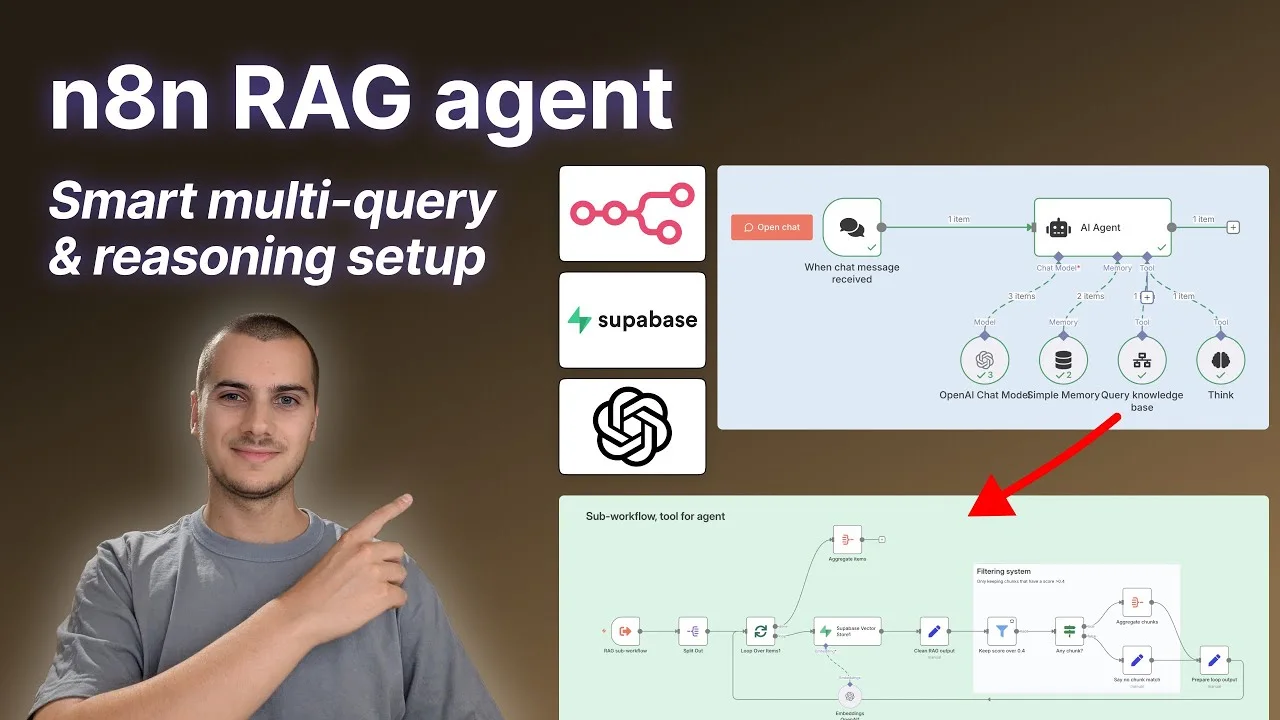
The canvas everyone starts from
My knowledge base for this is a biology course, vectorized into Supabase. Ask it “what is a cell” and it answers well. That’s the demo everyone shows, and it’s not a lie, simple questions work.
AI agent
- When chat message received
- AI AgentChat ModelOpenAI Chat ModelMemorySimple MemoryToolSupabase Vector StoreThe agent writes the query, four chunks come back
Here is what you control in that setup: a description on the tool, telling the agent when to use it. That’s the whole surface.
What you setOnce, at build time
- A tool description
- How many chunks to return
What the agent decidesEvery call
- The exact query text sent to the vector store
- That there is one query, never two
- Nothing about how close a chunk has to be
You never see the query
The agent writes the query itself and sends it. You can nudge it with the tool description and hope. On a question that needed rewording, or one where the user’s phrasing is nothing like the wording in your documents, you find out by looking at the execution log afterwards.
One query per call
A real question often isn’t one question. Ask something that needs a term defined and then that term related to another one, and a single similarity search has to cover both at once. It returns chunks that are middling for both instead of good for either.
The agent can call the tool twice, but that’s two full turns of the model, and it usually doesn’t bother.
Four chunks come back whatever you asked
This is the one that made me change the setup. The vector store returns the four closest chunks. Closest, not close.
Ask my biology course when we’re having dinner tonight, and you still get four chunks. They’re far, but they’re the four least far, so up they come. The agent receives them with no indication that they’re junk, and models are agreeable, so it treats them as relevant material.
Query: “when are we having dinner tonight”
The scores exist inside the vector store. The tool doesn’t hand them to you.
Put a sub-workflow where the tool was
The fix is to stop giving the agent the vector store, and give it a sub-workflow instead. In n8n that’s the Call n8n Workflow tool: the agent calls it, a workflow runs on its own canvas, and whatever the last node outputs is what the agent receives.
The agent’s side barely changes. Same trigger, same agent, and the vector store swapped for two tools.
AI agent
- When chat message received
- AI Agentgpt-5-miniChat ModelOpenAI Chat Modelgpt-5-miniMemorySimple MemoryThe last 8 turnsToolQuery knowledge baseThe sub-workflow. Takes an array of 1 to 5 queriesToolThinkUsed right after the retrieval, 50 words max
The sub-workflow is where all the new surface is. Every box below is a step you wrote, and one you can open in the execution log afterwards.
Sub-workflow, tool for agent
- RAG sub-workflowTrigger. Input: queries, an array
- Split OutOne item per query
- Loop Over ItemsEverything after this runs once per query
- Supabase Vector StoreAs a node, not a tool. You map the query, and each chunk comes back with its scoreEmbeddingEmbeddings OpenAI
- Clean RAG outputKeeps the chunk text, its chapter name and its score rounded to two decimals
- Keep score over 0.4Filter. Always outputs data, so a query that matched nothing still continues
- Any chunk?IF, on whether anything survived
true, something passed
- Aggregate chunks
false, nothing passed
- Say no chunk match"No chunks reached the relevance threshold, the knowledge base was unable to provide information"
- Prepare loop outputThe query, paired with what it returned
↩ Prepare loop output goes back into Loop Over Items. Once every query has run, the loop's done output goes to an Aggregate node and the agent receives a single field, Knowledge base retrieval.
An array of queries, in one tool call
The sub-workflow’s trigger accepts a field called queries. The tool description tells the agent it’s an array of one to five, and the system prompt says the same thing in the other direction: the more complex the user’s question, the more you break it into sub-queries, up to five.
That’s the multi-query part, and it costs one tool call rather than three.
- The user asks one complex questionTwo terms, and how they interact
- The agent writes three queriesDefine the first, define the second, how they relate1 tool call
- The sub-workflow runs all threeA loop, and a score on each result
- One aggregated item comes backGrouped by query
The score is the whole point
Inside the sub-workflow, Supabase is a regular node, so I map the query myself and the response carries a similarity score. The filter drops anything at or under 0.4.
Two details that cost me time. The filter has to be set to always output data, otherwise a query where nothing passed produces no item at all and the branch after it never runs. And the IF that follows checks whether any chunk survived, because that’s the case you want to handle out loud rather than by returning silence: the agent gets a sentence saying the knowledge base had nothing useful for that query.
Tell the agent where a chunk came from
The clean-up step matters more than it sounds. Supabase returns metadata I have no use for, things like the content type of the source file, and that’s tokens on every chunk of every query.
What I keep is the chunk text plus two fields: the chapter it came from, and its relevance score rounded to two decimals. Both go to the agent. The chapter name lets it say where something comes from, and passing the score through means the agent can see that one of its five queries scraped in at 0.42 while another hit 0.81, and weigh them accordingly.
Name what you hand back
The aggregate at the end doesn’t produce an anonymous blob. It produces one field called Knowledge base retrieval, and inside it each entry pairs Query to the knowledge base with Chunks returned.
That pairing is doing real work. The agent sent three queries, it gets three labelled groups back, and it can tell which chunks answer which part of its own question. Hand it a flat array of twelve chunks instead and it has to infer the mapping, which it will do, badly, some of the time.
Naming the fields costs one Set node. It’s the cheapest thing on this list and the one I skipped for the longest.
A think step before the answer
The other change is on the agent itself. I gave it a think tool, and the system prompt tells it to use that tool right after the retrieval comes back: analyse the question against what came back, and challenge whether it actually has what it needs to answer.
The tool description caps it at 50 words. Without that it writes paragraphs, and thinking out loud about four chunks is not worth a page of tokens.
You can read those notes in the execution log, which is the part I didn’t expect to like as much as I do. When an answer comes out wrong, the notes usually tell you whether the retrieval was bad or the reasoning was.
The last lines of the system prompt are the ones I’d keep if I could keep only two. Answer only from the course content, and if a question falls outside it, redirect rather than answer. And if you don’t have what you need, say so rather than answering from general knowledge anyway.
Both only work because the retrieval below them is honest about coming back empty. An instruction to admit ignorance is worthless when every query returns four chunks that look like evidence.
What this is really teaching
Every fix here is the same fix. Something was being decided for me, I moved it into a step I own.
That’s worth more than the workflow. When I work in Claude Code now, the questions I ask are the ones this setup forced me to ask: what exactly got searched, how much came back, how much of it was worth reading, what is sitting in the context window that nobody needed. A generic agent hides all of that by default, and it will happily read twenty files to answer something that needed two.
Building the retrieval by hand once is how you learn to notice.