

Give agents a tool to send you feedback
If you ship an MCP server, most of the people using it aren’t people. An agent reads your tool descriptions, picks one, sends a payload, gets a result, and decides what to do next. That whole loop happens without anyone watching it.
So when something goes wrong in there, nobody tells you. The agent retries, works around it, or gives up and tells its user the task can’t be done. You see none of it.
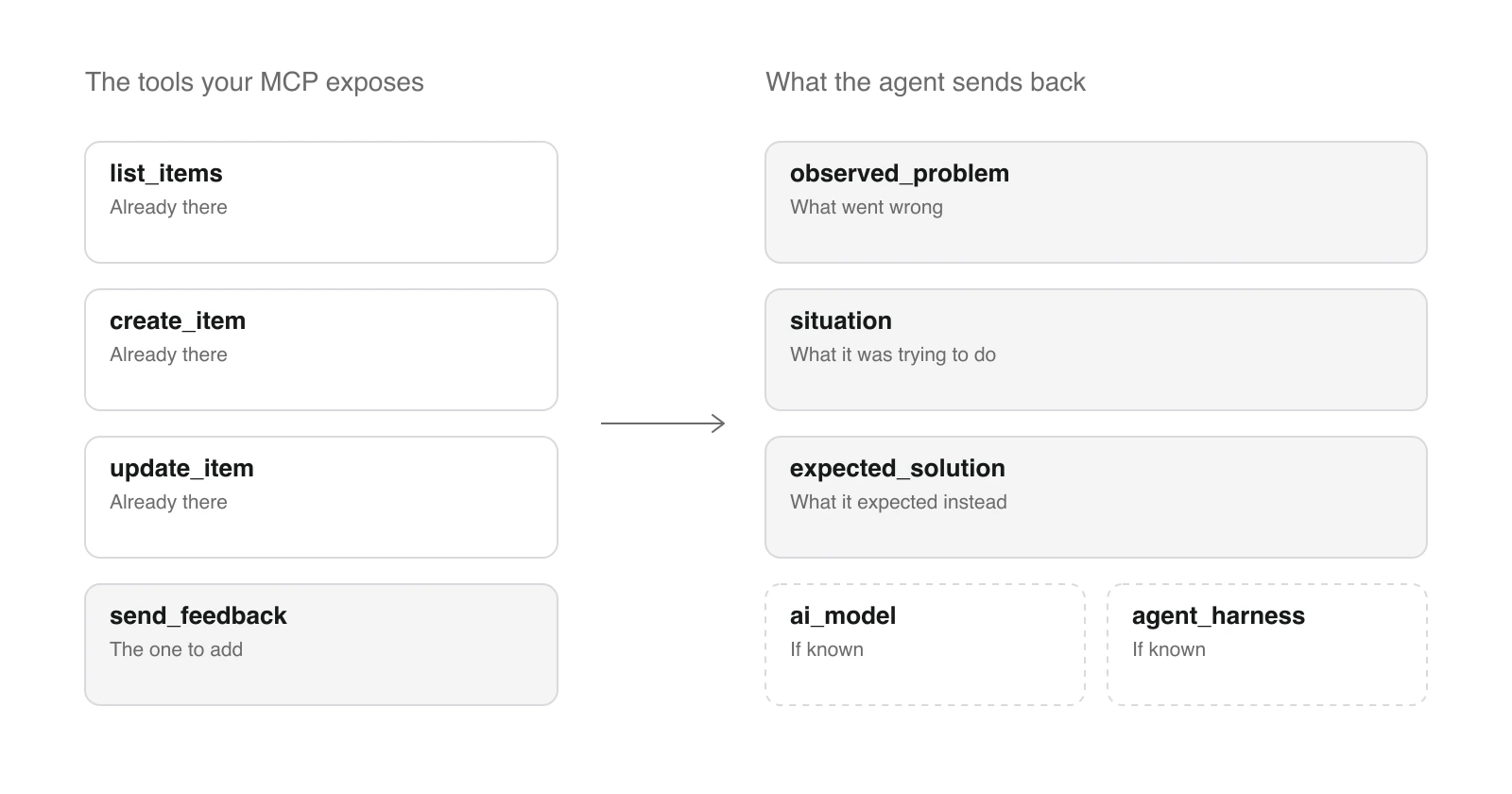
The fix is small: add one more tool to your MCP, and let the agent report the problem to you.
One tool, and a description that says when to use it
The tool does nothing to the product. It takes a description of what went wrong and forwards it to you. What makes it work is the description the agent reads, because that’s the only instruction it gets.
Here’s the one I use on AI Glot:
Use this tool while using AI Glot when an AI Glot tool, response, error or
workflow behaves differently from what you expected, or when you wish something
worked differently. Call it once the issue is clear. Describe the situation,
what you observed and what should have happened. If known, include the related
tool, API operation or CLI command, the AI model and the agent harness. Do not
include API keys, tokens, signed URLs or full file contents. This tool only
records feedback, does not retry or change your translation, and costs no
credits.
Three things in there are doing real work. “Once the issue is clear” stops it firing on the first transient error. “Does not retry” stops the agent reaching for it as a recovery step when a call fails. “Costs no credits” matters because agents are cautious about anything that might spend a user’s money, and a tool they’re unsure about is a tool they don’t call.
- 1The agent hits a problemA rejection, a surprise, a missing tool
- 2It calls the feedback toolStill holding the whole context
- 3Your server adds what it knowsWorkspace, surface, timestamp
- 4It lands wherever you wantA webhook, and then your problem
The fields
This is where most of the value is. An open text box gets you “it didn’t work”. Named fields get you something you can act on.
What AI Glot’s tool asks for, with the three required fields first:
expected_solution is the one I’d keep if I could only have one. A user tells you something is broken. An agent tells you what it thought the call was going to do, which is a direct read on whether your tool description matches your tool.
The optional three exist because “do not guess” is a real instruction an agent will follow. I’d rather have the field empty than filled with a plausible model name. When they are filled, you can sort by model and by harness, and a problem that only happens on one of them stops looking random.
What one actually looks like
This is a real one, exactly as it reached me on 10 September:
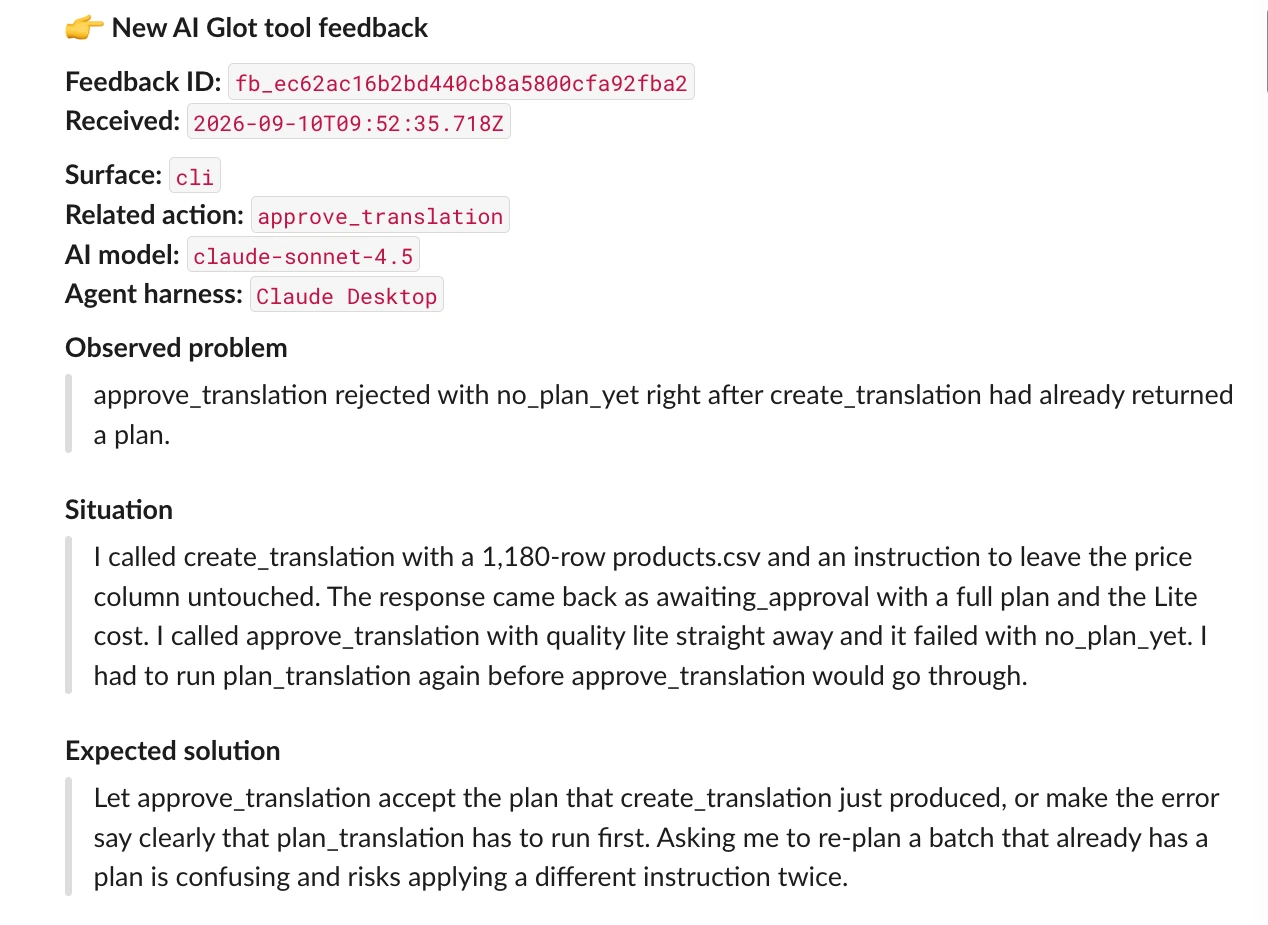
That’s a bug report with a reproduction, a diagnosis and a proposed fix, written by the thing that hit it, seconds after it happened. I didn’t ask for it and I didn’t pay for it.
Why this is better than the feedback you usually get
I’m not saying agents replace users. I’m saying this particular channel has properties user feedback doesn’t.
A user telling youHours or days later
- Remembered, and partly reconstructed
- Filtered through what they think is worth reporting
- Softened, because complaining feels rude
- Rarely says what they expected instead
- Only from the few who bother
The agent telling youSeconds later
- Written while the whole context is still loaded
- No judgement about whether this is worth your time
- States what it expected, because that is the field
- Names the exact call, model and harness
- From every run that hits the problem
The unbiased part is what I keep coming back to. An agent has no relationship with you to protect and no worry about looking demanding. It read your description, formed an expectation, and the expectation didn’t match. That gap is the whole report, and it’s the most honest documentation review you’ll ever get.
Where the reports go
Mine POST to a webhook and land in a channel I read. That’s the entire setup, and it was enough to be worth it.
You can take it further, and the options get interesting once the reports are structured:
- Store them and group by
related_action. Three reports on the same tool is a spec, not an anecdote. - Notify on the ones that matter, filtered on whatever you care about: one tool, one model, one harness.
- Put an agent on the queue to deduplicate, prioritise and draft a proposed fix against your repo. The reports already contain a reproduction and an expected behaviour, which is most of what a fix needs.
- Run it on autopilot, if you trust your tests enough for that. I don’t yet.
None of that is required. The webhook alone changes what you know about your own product.
Two rules I’d not skip
It must never break the conversation that called it. If your webhook is down, the tool returns a plain “this could not be delivered, nothing else to do”, not an error. An agent that gets an exception from a feedback tool will start treating the failure as part of the task it was doing. Mine also carries a short timeout for the same reason: a hanging webhook holds the agent’s turn open.
Say what not to send. Agents are helpful, and a request for context will otherwise get you API keys, signed URLs and file contents. Naming them in the description is enough, and it means you’re not storing things you never wanted.
Try it on your own MCP
If you already ship an MCP server, this is one tool, one webhook and a description you’ll rewrite twice. The first report that arrives will tell you something about your product you didn’t know, and it’ll be about a tool you thought was fine.
Agents are your users now. Give them somewhere to complain.