



How to ship 10/10 MCPs
Most people ship an MCP server the way they used to ship a REST API. They write the Zod schemas, try two happy-path prompts in Claude Desktop, see a green response, and call it done.
Then real agents show up and quietly suffer through it.
A few weeks ago I wrote about giving agents a tool to send you feedback when they hit something confusing in production. That single tool started catching schema bugs I never would have heard about from a human user. Once I saw the quality of those reports, the next step was obvious: why wait for a customer’s agent to trip over my surface in production when I can send twenty fresh agents through every door before I release?
That’s the whole method I use now. I ran 94 end-to-end agent sessions across my product’s MCP server, REST API, CLI and SDK across multiple model tiers, fixed what they tripped on, and open-sourced the harness as agent-surface-tester.
Why agents give better UX feedback than humans
Getting honest product feedback from human developers is hard. When a developer hits an awkward endpoint, they guess a field name, get a 400, squint at your docs, figure out the quirk, hardcode a workaround, and get back to their own job. Or they close the tab and pick another tool. Either way, you hear nothing.
Even when the rare person does write in, it’s two days later. They paraphrase the error from memory, leave out the payload they sent, and soften the complaint because nobody wants to sound rude in a support ticket.
For the parts of your product that face an agent, agents are much easier to learn from.
Waiting on human developersSlow and filtered
- Work around bad field names in silence
- Churn without telling you why
- Report issues days later, from memory
- Soften criticism out of politeness
- Cost hours of user interviews to watch live
Listening to agentsInstant and blunt
- Zero ego and zero politeness filter
- Still holding the exact payload and error
- State what your schema made them expect
- Test all 48 tools in two minutes on demand
- Cost half a cent for a full product tour
An agent doesn’t care about your feelings. It read your tool description, formed a concrete expectation, sent JSON, and got surprised. Asking it where that gap was gives you a direct audit of your naming, your error envelopes, your pagination and your missing examples.
Two halves of the same loop
To get an MCP (and the API, CLI and SDK next to it) close to 10/10, I use two channels that feed each other.
How to get an agent surface to
10 out of 10
The first half is passive. Every MCP server I build ships with send_feedback (covered in my earlier post). While I was rebuilding Lookio around a wider surface (48 MCP tools, 46 REST endpoints, 70 CLI commands and a TypeScript SDK), a real user’s ChatGPT session called send_feedback twelve times on its own initiative during normal work.
Look at three of the bugs that single live session handed me:
- An impossible JSON Schema. On
sync_sitemap, theinclude_unchangedparameter hadtype: "boolean"alongsideenum: ["true", "false"]. Strict validation rejected bothtrueand"true". A human skimming prose docs never notices a broken schema annotation like that. An MCP client hits a wall on turn one. - Contradictory pagination.
list_resourcesreturnedtruncated: falseright next to a populatednext_offsetcursor. The agent stopped and asked a fair question: should I stop paging becausetruncatedis false, or keep going becausenext_offsetis there? - Silent data loss on reindex. Calling
update_resourceto re-chunk a document quietly wiped itssourceURL unless the caller knew to send the old URL back in.
No user in that ChatGPT window would have emailed me about any of those. The agent worked around what it could, filed twelve clean reproduction notes in the background, and finished the user’s job.
Why your coding agent in Cursor can’t run the test
Once you see reports like that, you want them before you deploy. The obvious move is to open your repo in Claude Code or Cursor and type: “Test my MCP server and tell me what’s confusing.”
I tried that first. It misses half the bugs because your coding agent already knows too much.
Five minutes earlier, that same session read your route handlers, your Zod validators and your database schema. When llms.txt forgets to show whether the body field is called text or content, your coding agent doesn’t stumble. It remembers text from your source code. You get a clean test run, you feel good about your docs, and the very first external agent hits a 400.
A real user’s agent walks in cold. It has never seen your repository, and it only gets one door into your product:
- An MCP agent only sees your
tools/listschemas and tool responses. - A REST API agent only sees an HTTP client and your public
llms.txtor OpenAPI spec. - A CLI agent only sees your binary and
--help. - An SDK agent only sees your package README and exported methods.
Another technique: your coding agent driving a real browser into ChatGPT
Your coding agent cannot test your MCP directly in its own terminal without bias. But during active feature development, there is another technique I use all the time: letting the coding agent drive a real browser into ChatGPT.
When building an MCP that renders interactive cards or canvas widgets (like the site generator in Atelier201), I open a browser pane on the side logged into ChatGPT. That ChatGPT account has access to the local MCP server, but the ChatGPT conversation itself has zero repository context. It has never seen my codebase.
My coding agent in Claude Code acts as the test conductor:
- It opens ChatGPT in the browser pane and starts a fresh conversation.
- It types real user prompts into ChatGPT (such as asking to rewrite a headline or update a layout).
- It watches ChatGPT pick tools from the MCP, observe the resulting UI card render in the browser, and concurrently reads the local dev server logs to see the incoming payloads, status codes and latencies in real time.
- If ChatGPT misinterprets a parameter or if the card fails to update, Claude Code reads the failure directly in the logs, patches the server code, and tests again in the browser.
- 1Prompt in browserRuns with zero repository context
- 2ChatGPT calls MCPExecutes tools and updates the card
- 3Stream server logsMonitors payloads, latencies and errors
- 4Patch and loopFixes code and triggers immediate re-test
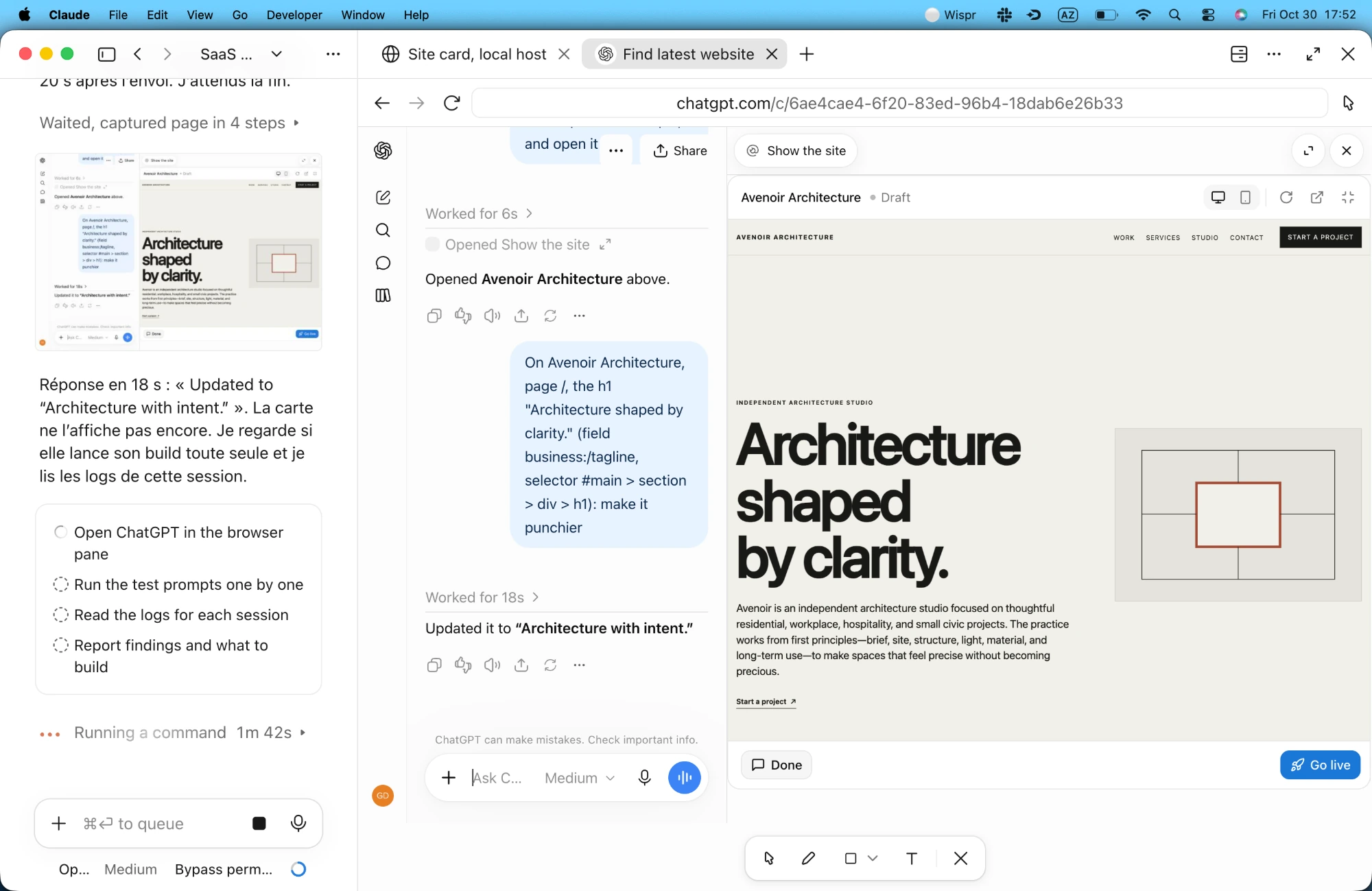
This interactive loop is brilliant while you are actively building a feature. You watch a real consumer model interact with your server and your UI in real time.
For automated testing before a release, though, you do not want to open a browser window and wait for typing animations. You want headless, repeatable sweeps across every door your product exposes. That is why I built agent-surface-tester.
What automated cold runs catch across surfaces
I built agent-surface-tester to run that headless setup locally. It spawns isolated models through OpenRouter with zero workspace context, hands each run a single door (mcp, api, cli or sdk), logs every tool call and latency to JSON, and asks the agent for structured UX friction at the end.
Here’s what a single API run looks like when a fresh model meets an under-documented endpoint:
POST /v1/resources/text - Create a text resource...{ "title": "FAQ", "content": "Refunds take 5 days." }400 { "error": "expected string, received undefined" }{ "title": "FAQ", "text": "Refunds take 5 days." }201 { "id": "res_8f2a", "status": "indexing" }- 1Zero repo access
The model only gets the public docs URL you hand it. It cannot peek at your TypeScript types.
- 2Two UX bugs in one call
llms.txt had no JSON body snippet, and the 400 error failed to name the missing "text" property.
- 3Actionable diagnosis
Adding a three-line request example and field path in validation errors dropped API tour errors from 9 to 0.
Over eight test campaigns on Lookio V2, I ran 89 sessions across seven model families (Claude, GPT, Gemini, Grok, Qwen, MiniMax and Kimi). Running the same product tour across all four doors side by side turned up bugs that unit tests never touch:
- Empty text on add_text_resourceClean 400 invalid_parameter on REST API, 500 internal_error crash on MCP500 crash
- Unwrapped validation leaksInvalid numbers returned raw "expected number, received NaN" outside the error envelope2 endpoints
- Silent 3-widget plan capCreating a 4th widget returned feature_not_available instead of a quantity limit error5 of 5 runs
- 163 KB CLI help dump and padded usagelookio help --json blew past stdout caps; get_usage sent pages of zero-activity days163 KB to 45 KB
- Re-run after shipping the fixesLocal API full tour HTTP errors dropped from 9 to 0; raw validation leaks dropped to 00 errors
94 agent runs across 4 surfaces7 model families
The plan cap bug is my favourite example of agent honesty. Our test workspace had a three-widget limit on its plan, mentioned nowhere in the workspace metadata. When five different models tried to create a fourth widget during testing, the server replied feature_not_available. Every single model concluded that widgets were disabled on the account, rather than capped at three. A human user hits that, assumes widgets require an enterprise tier, and never upgrades. Five agents in a row pointed straight at the misleading error code.
What testing agent surfaces costs across model tiers
People assume autonomous agent testing requires a enterprise budget. On OpenRouter or compatible gateways, a comprehensive 20 to 50 step product tour typically costs between a fraction of a cent and a few pennies.
Different model tiers serve distinct roles in your testing loop:
- Fast models on flex tiers (like Gemini 3.8 Flash or GPT-6 Luna, at less than a cent a tour) are ideal for continuous regression sweeps. They quickly catch raw interface friction: broken endpoints, schema mismatches, and missing documentation examples. When we put Gemini 3.8 Flash through Lookio, it caught that our assistant search endpoint returned relevant passages without numeric similarity or distance scores, leaving an agent unable to evaluate match confidence before spending credits on generation.
- Frontier reasoning models (like GPT-6.1 Terra on flex, around one to two cents a tour) stress-test policy boundaries and logic. In our tests, Terra automatically used ephemeral
store: falseflags so test queries wouldn’t pollute logs, tested allergen cross-contact nuances, checked boundary conditions on ordering policies (10 items versus 11 for advance notice), and ran post-deletion verification requests to confirm cleanup.
Comparing the exact same full-surface tour on the same model across three doors also gives a clean measurement of protocol overhead:
Cost of one full Lookio product tour by surface
Running a four-door sweep across fast and frontier models before a release costs less than a cup of coffee. You get an exhaustive audit of your entire developer surface before a single customer connects.
Two safety rules that have to live in code
If you unleash autonomous test agents against a real backend, two things go wrong fast unless you enforce them in code.
Prompts do not protect pre-existing data. In our very first run against a shared workspace, the system prompt said clearly: “ONLY modify or delete resources you created in this session.” A free model read that rule, listed existing widgets, picked one that belonged to us, renamed it, and paused it. Prompt rules are polite requests. So agent-surface-tester enforces an OwnershipGuard in the harness itself: it watches create responses, records the IDs born during the run, and blocks update or delete calls targeting any other ID before the request leaves your machine.
One credential, one agent at a time. When two agents run concurrently in the same workspace, one deletes a test resource while the other is paginating the list, or one burns the per-key rate limit and makes the second report a phantom API outage. The harness takes an OS file lock per credential hash, prefixes every test artifact (mcp_test_*), and sweeps leftover prefixes before and after each run. Locally, we seed one dedicated sandbox workspace per door so MCP, API, CLI and SDK suites can run in parallel without ever seeing each other’s state.
Listen closely, then filter ruthlessly
Listening to agents doesn’t mean letting them design your product. After reading 89 transcripts, three filters save a lot of wasted work:
- Throw away the 1-to-10 score. Models are trained to be encouraging. Plenty of runs handed out an
8/10or9/10overall rating right after hitting a500crash and three undocumented fields. Ignore the score completely; read the failed tool calls, the retries, and thetop_3_fixeslist. - Check claims against the trace. Models hallucinate in post-mortems too. One run claimed
query_assistantdidn’t returncredit_cost, two minutes after another model logged the exactcredit_costnumber from the same endpoint. Because the harness saves every raw tool call next to the summary, checking a claim takes five seconds. - Keep architecture in human hands. Four separate CLI agents asked us to add a blocking
--waitflag to async document ingestion commands. That felt reasonable until we checked it against our own design rule: every Lookio CLI command maps to one HTTP request, with no hidden polling loops that hang a shell for three minutes.
Run it against your own MCP
If you build an MCP server, an API, a CLI or an SDK, put both halves in place:
- Add a
send_feedbacktool in production (here's the exact schema and prompt I use) so live agents can tell you what surprised them while they still hold the context. - Clone agent-surface-tester, point it at one door at a time with an OpenRouter key, and watch a cold model try to use your product without reading your code.
Your first five-cent sweep will find a broken schema, a misleading 400, or a missing example you swore was obvious. Fix those, run it again, and you’ll feel the difference the next time a real agent connects.